
Just two days ago, Flux 2 dropped another new small size model called Flux 2 Klein. These models are specifically designed to run right on your local PC. No cloud needed. On Black Forest Labs official website, they’ve laid out what’s included in these AI models, so you know what you’re getting before you download.
I’m going to take a close look at how it actually works and compare its features side by side with similar image editing models like Qwen ImageEdit 2511.
Flux 2 Klein Image Editing Models at a Glance
Flux 2 Klein is a compact model built primarily for image editing, not just generic text-to-image. You’ve probably seen other editing-focused models out there like Nano Banana or Qwen image edit, but those tend to be large parameter models.
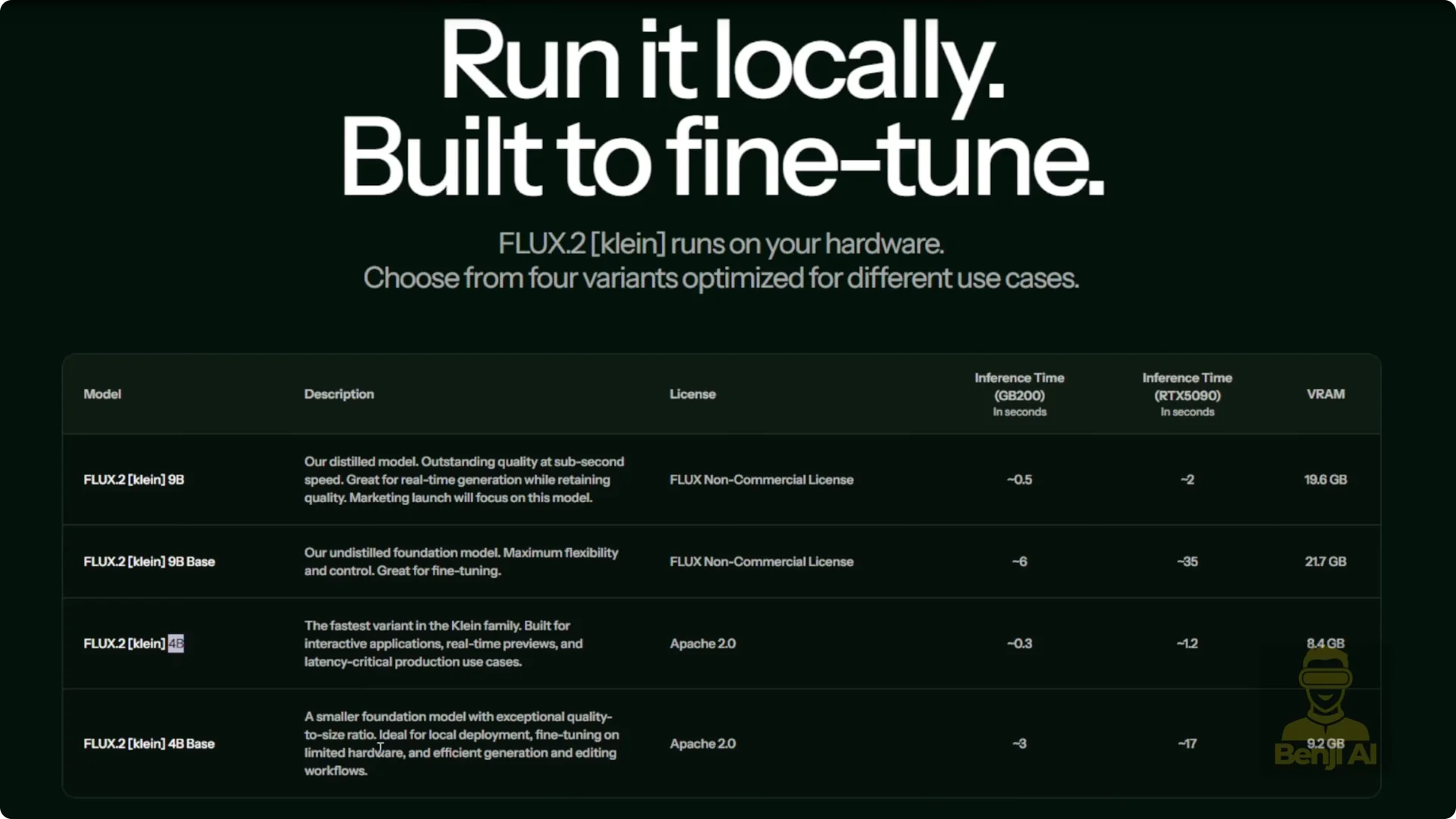
Flux 2 Klein is really small. There are two versions: a 9 billion parameter model and a 4 billion parameter model.
You’ve got the bigger, more capable version and then the smaller lightweight one, the 4B, which is trained specifically for image editing tasks. It can also do text-to-image generation, but that’s not really the main focus here.
The real strength of Flux 2 Klein lies in its ability to edit existing images while preserving style and structure. There are key differences between these models not just in performance, but also in licensing, inference speed, and VRAM requirements.
Distilled vs. Base Variants
- The 9B version comes in two flavors, a 9B and a 9B base. The base model doesn’t include distillation, which means it typically needs higher sampling steps during inference to get good results.
- The standard Flux 2 9B model includes distillation, so you can use lower sampling steps and still get solid output.
- Same goes for the 4B model. Both the 9B and 4B distilled versions are optimized for faster, lighter inference.
- If you see “base” in the model name, like 9B base, that means it’s the raw open-weight version trained on the full data set without any distillation tricks. It’s more flexible but heavier on your system.

Licensing
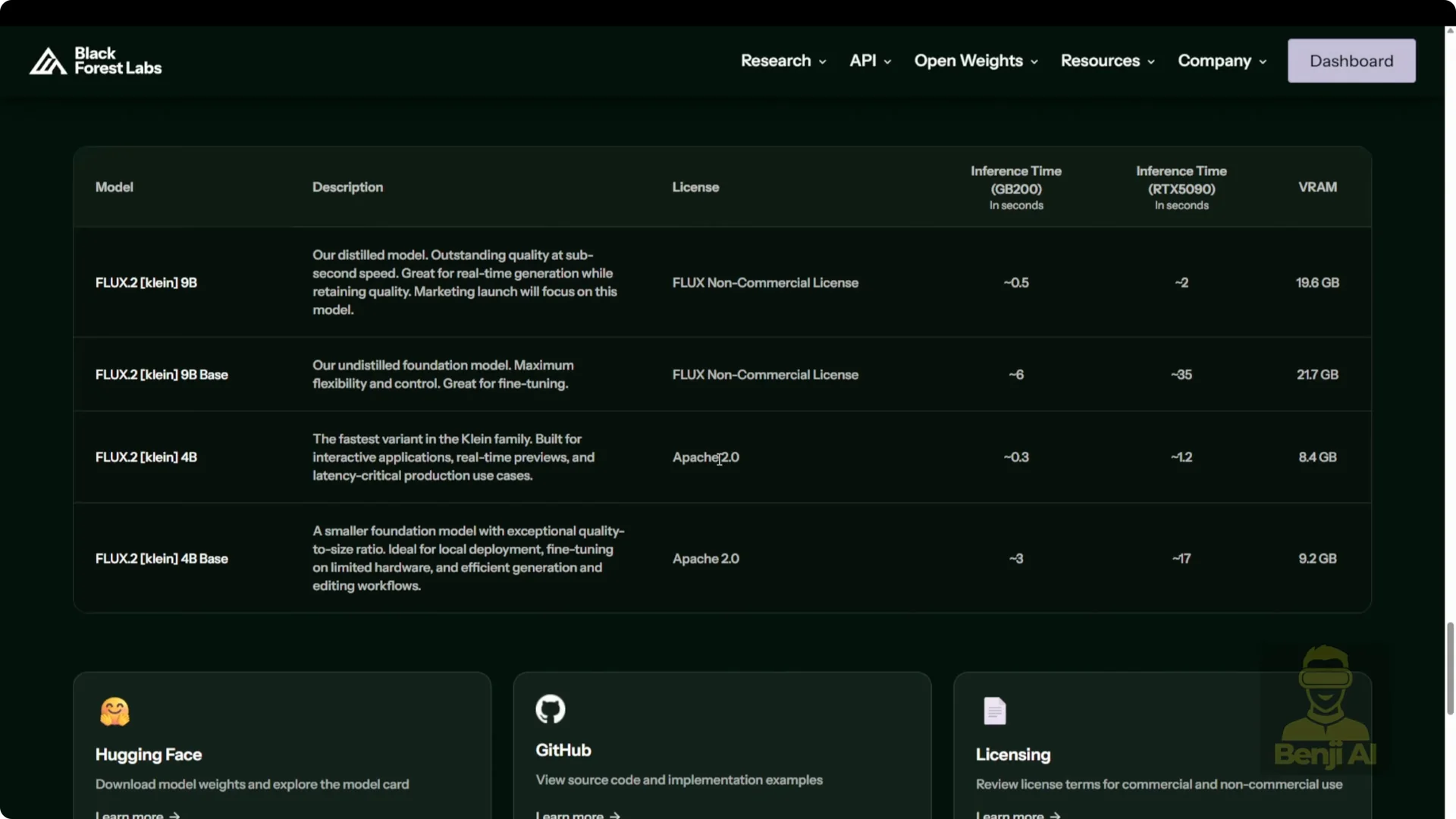
- The 4B model is released under the Apache 2.0 license, which is completely free.
- For most other Flux models, including previous versions like Flux 1 and Flux 2, Black Forest Lab uses their own custom commercial license.
- The 9B and 9B base models both come with a non-commercial license.
- If you want total freedom to use the model however you like, the 4B version is your best bet. Plus, it’s lighter on your system.

VRAM and Quantization
- According to the official site, the 4B distilled model needs about 8.4 GB of VRAM, while the base 4B model needs around 9 GB. That’s before any quantization.
- On HuggingFace, you’ll find GGUF quantized versions that are even smaller, some trimmed down so much that they’ll run comfortably on GPUs with under 16 GB of VRAM.
- For most regular users, the 4B model is more than enough.
Getting Flux 2 Klein Image Editing Running in Comfy UI
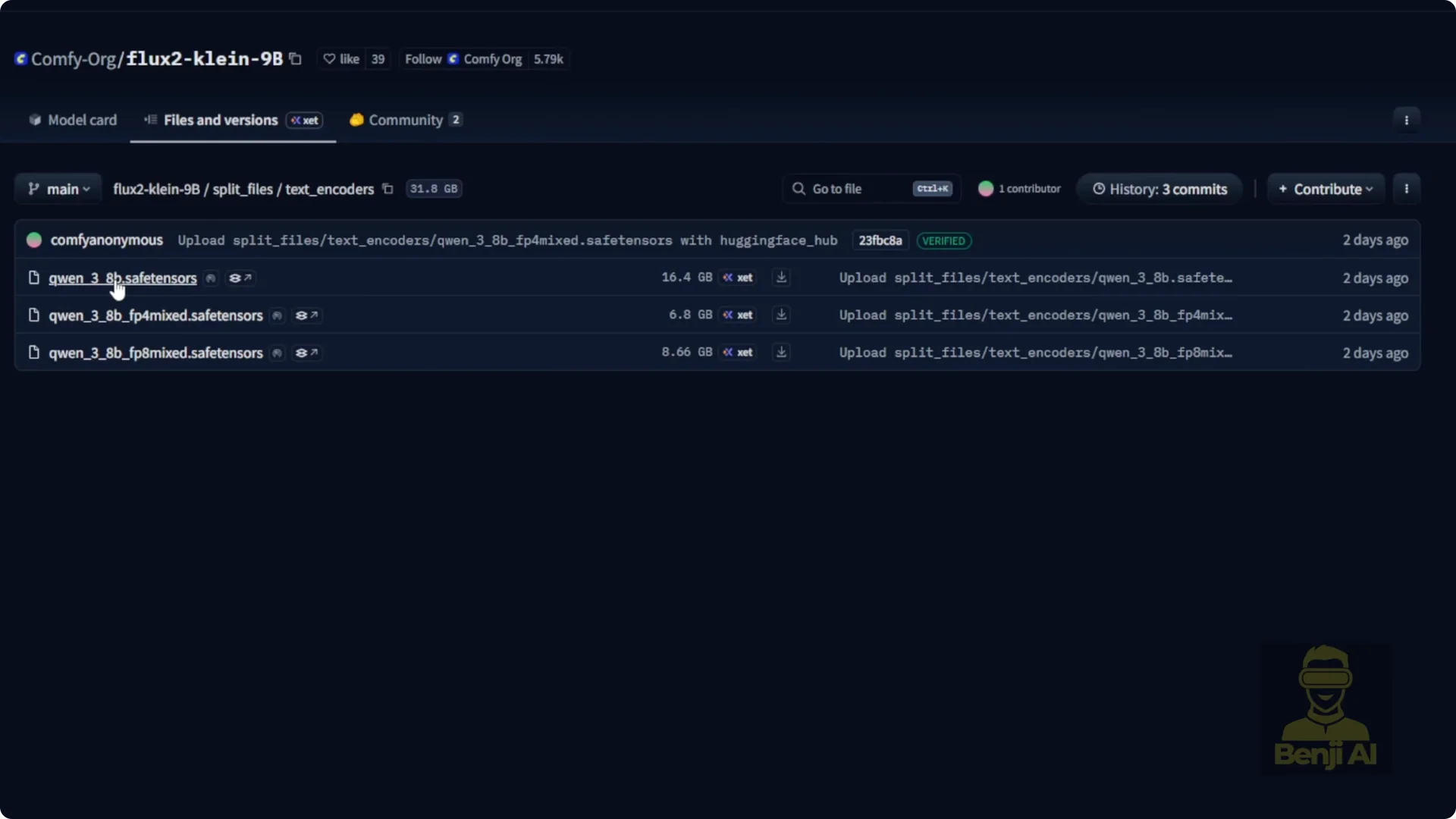
There’s a dedicated HuggingFace repo that Comfy UI has repackaged specifically for the 9B and 4B Flux 2 Klein models, split into components to give you more control. With the 9B version, you’ve got separate downloads for the text encoder and VAE. Each part uses different amounts of VRAM, so depending on your GPU, you can pick the right combination.
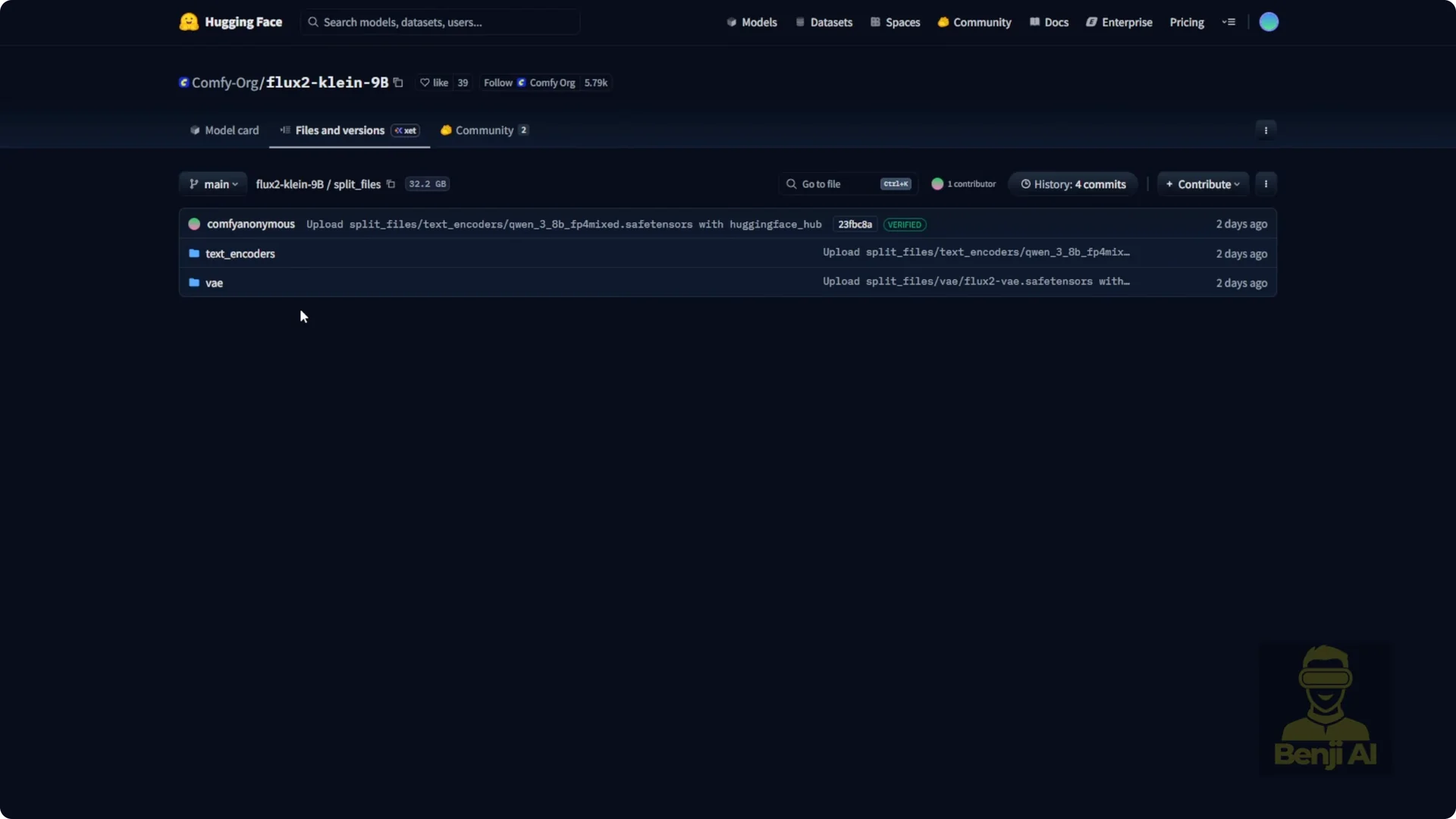
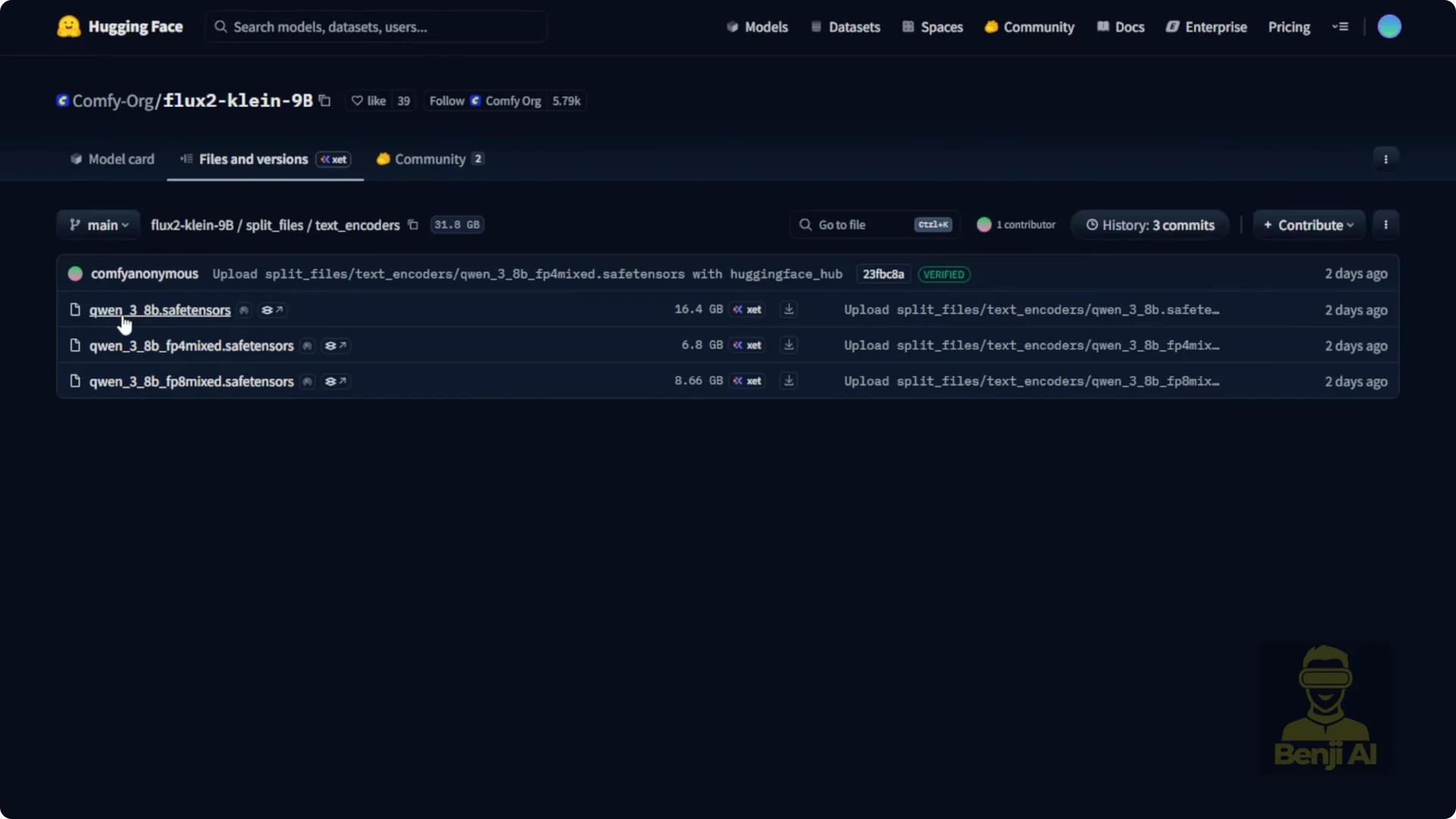
- The text encoder BF16 version is about 16 GB in file size, which means it’ll eat up roughly that much VRAM when running.
- FP4 mix or FP8 mix are only 6 and 8 GB respectively. Smaller files mean less VRAM pressure.
- If you’re really tight on memory, you can offload parts to your system RAM.
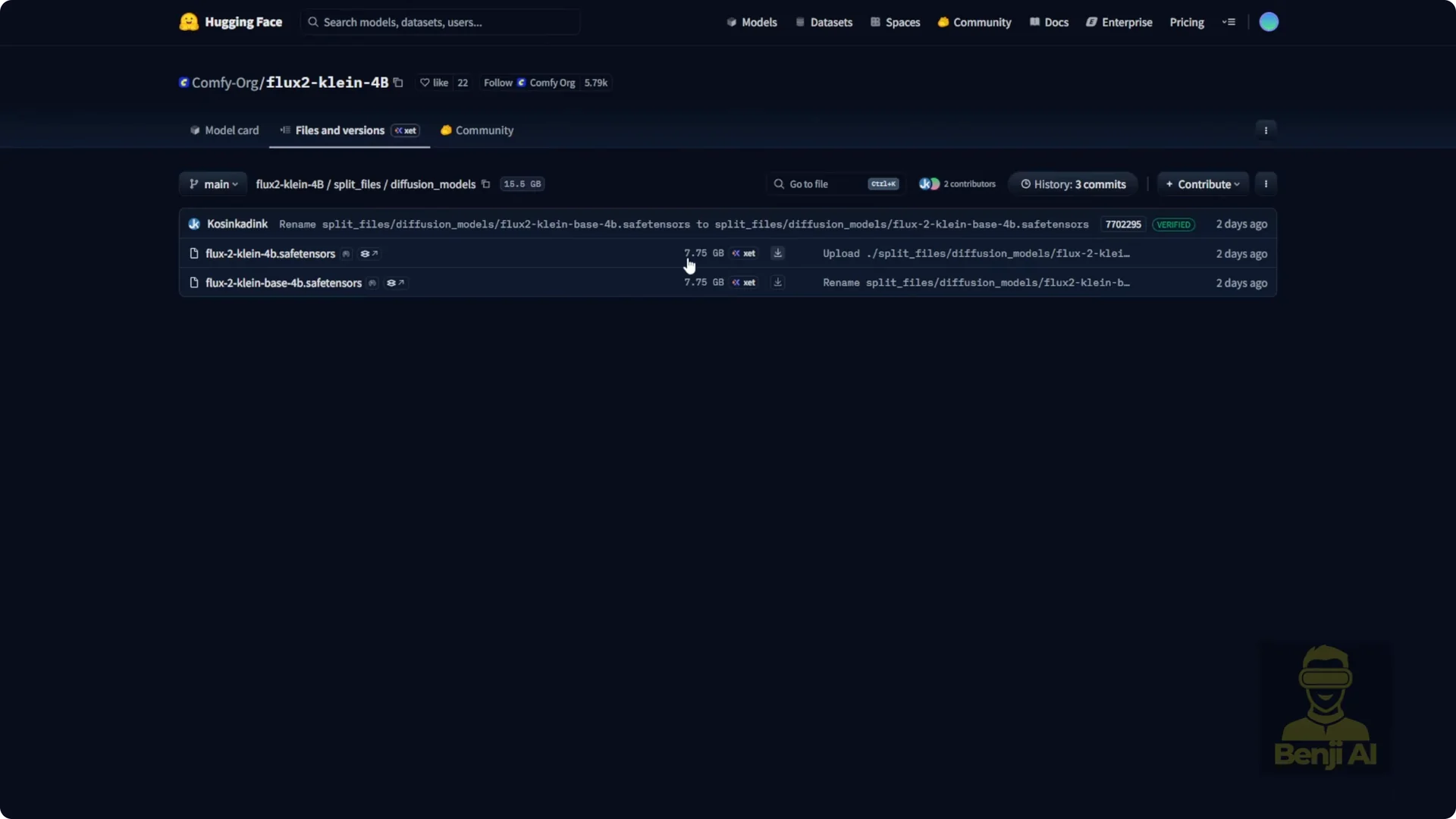
Same logic applies to the 4B model. The diffusion model files for both the base and distilled 4B versions are around 7 GB each.
Text Encoders and VAE
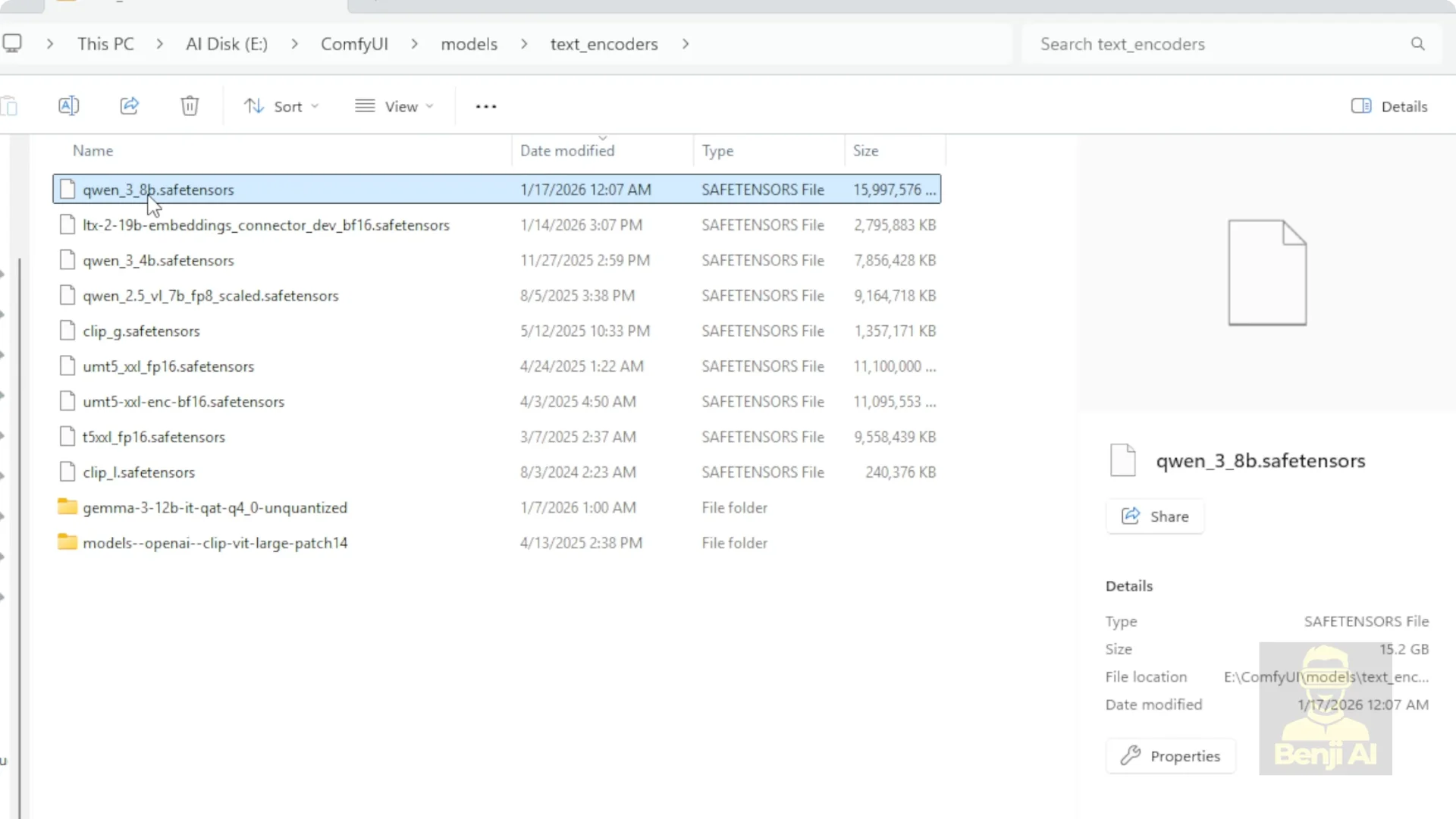
- The 9B model uses Qwen 38B as its text encoder, while the 4B uses Qwen 34B. If you’re planning to test both models, you’ll need to download two different text encoders. I did that for testing so I could switch between them cleanly.
- Both the 9B and 4B models use the same VAE, the Flux 2 VAE safetensors file. Download it once.
Repos and Downloads
- The 9B diffusion model isn’t in the Comfy UI HuggingFace repo. You need to grab it directly from Black Forest Labs official HuggingFace page. The 9B distilled safetensors file is a hefty 18 GB.
- For the 4B model, the full set, including diffusion, text encoder, and VAE, is available in the Comfy UI HuggingFace repo. If you’re sticking with 4B, you can get everything in one place.
- The whole setup can feel messy if you’re not paying close attention.
- There are multiple repos, split files, different versions. It’s easy to get confused and end up downloading the wrong combo.
- Before you download, check the chart and figure out which version matches your needs: distilled or base, 9B or 4B, BF16 or quantized.

Quantized Options
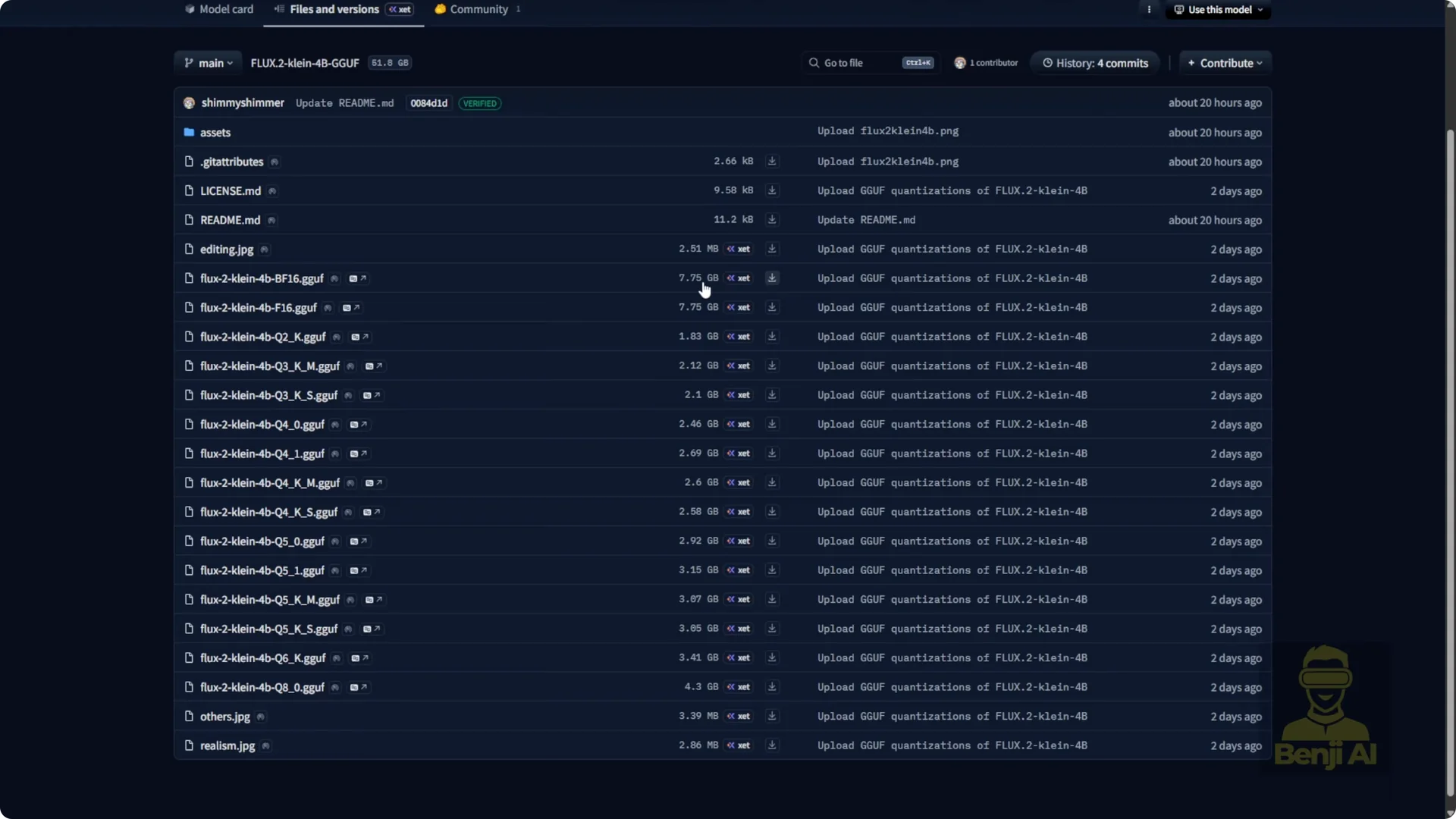
- The Unsloth HuggingFace page has GGUF quantizations of the Flux 2 Klein 4B model. If you’re running a GPU with less than 16 GB of VRAM, I’d strongly recommend one of these quantized 4B models.
- You’ll see options ranging from BF16, about 7 GB, down to Q2, about 1.88 GB.
Recommended Picks
- If you want maximum freedom and low VRAM usage, go with the 4B Apache 2.0 licensed model.
- If you need higher fidelity and don’t mind license restrictions, the 9B distilled version might be worth it.
- If you’re on modest hardware, grab a quantized GGUF version. Just make sure you know exactly what you’re downloading, because mixing up base versus distilled or using the wrong text encoder can lead to errors or weird outputs.
Step-by-Step Setup for Flux 2 Klein Image Editing in Comfy UI
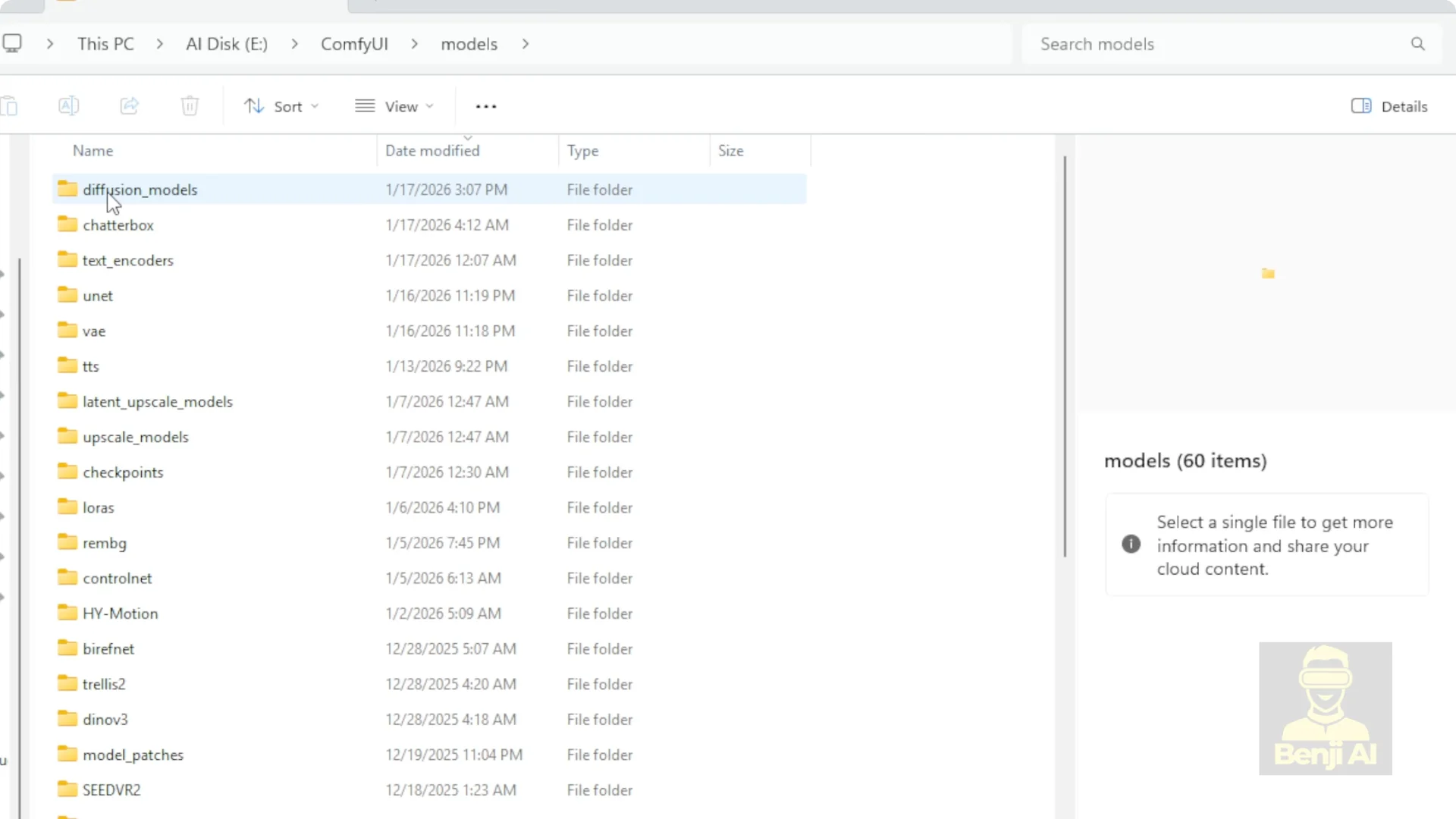
- Save the Flux 2 Klein 4B and 9B diffusion models into your Comfy UI models diffusion models folder. You can create subfolders inside there to keep things organized.
- Put the text encoders in the models text encoders folder:
– Qwen 38B for the 9B model.
– Qwen 34B for the 4B model.
- Place the Flux 2 VAE safetensors file in your models VAE folder. Download it once.
- Update Comfy UI. If you’re running a virtual environment with CUDA, run: git pull origin master to grab the latest main branch.
- Launch Comfy UI with: python main.py, then start the UI.
- The official Comfy UI blog has starter workflows that include subgraphs for Flux 2 Klein. I customized those subgraphs to handle each model size separately. In my workflow, the top row is the Flux 2 Klein 4B model, the middle row is the 9B version, and the bottom row is Qwen ImageEdit 2511.
- I chose Qwen ImageEdit because it’s another image editing model that runs locally in Comfy UI, making it a fair side-by-side comparison against Flux 2 Klein.
How Flux 2 Klein Image Editing Works
Using the Flux 2 Klein subgraph, the sampling steps and overall structure are very similar to the standard Flux 2 dev workflows you’ve seen before.
There’s one key difference: reference conditioning. Unlike regular text-to-image, this pipeline injects conditions from a reference image during the sampling process, which is how it edits specific objects while preserving the rest of the scene.
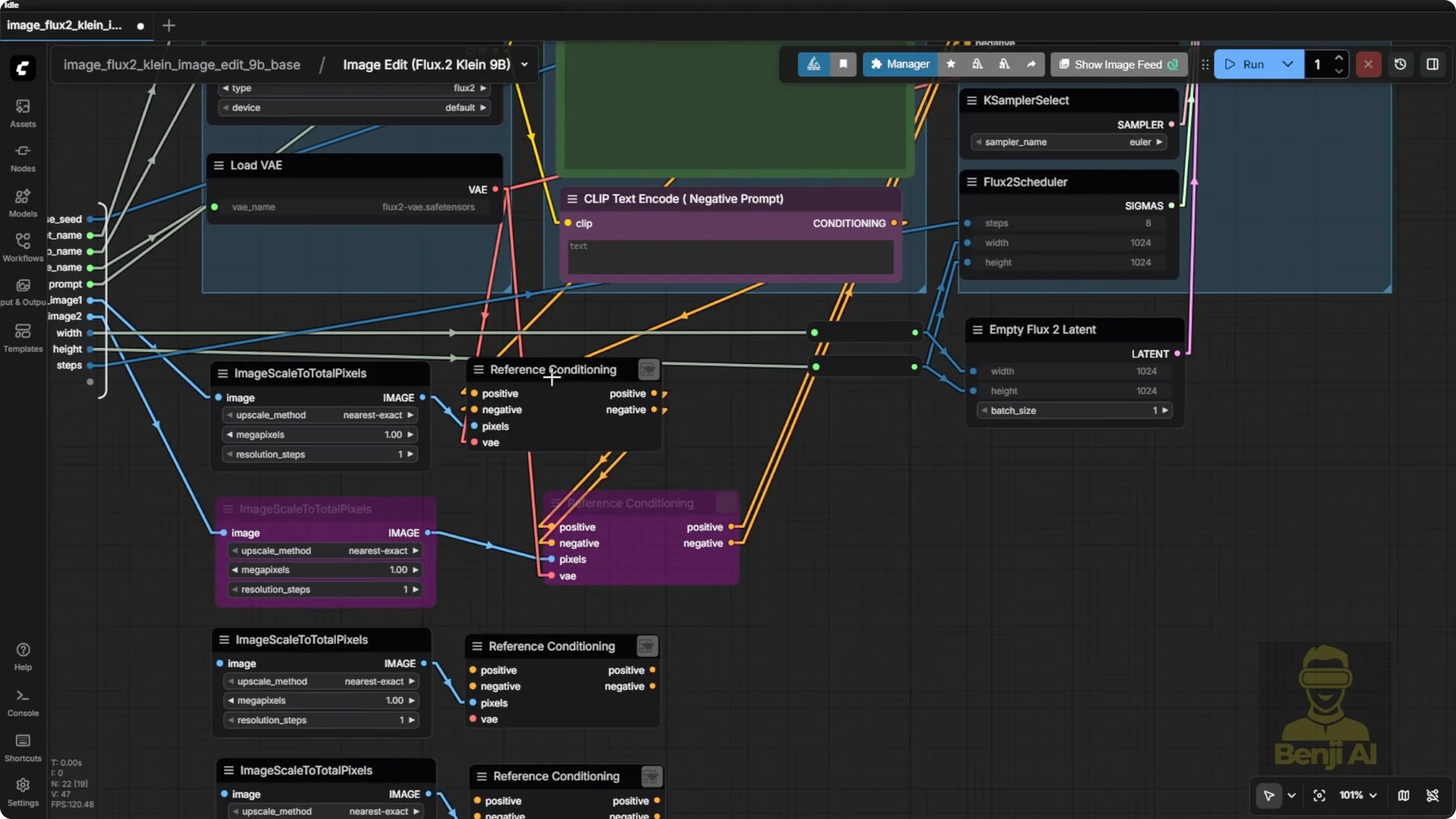
Inside the reference conditioning subgraph, it starts by encoding your input image through the Flux 2 VAE. Then it generates reference latents for both positive and negative conditioning. Both sides of the sampler need that latent representation of your reference image. The reference image has to be scaled to match the exact pixel dimensions of your generation. Otherwise, things get misaligned. Once that’s sorted, it feeds into the conditioning and the sampler does its thing.
The template I’m using is based on the official Comfy UI blog post. I won’t waste your time reading node names.
I’d rather focus on what’s actually happening in the connections. You’ve got your standard positive and negative prompts, plus the three core components: diffusion model, text encoder loaded via the clip node, and VAE.
All of these point to the split files we downloaded earlier, and they all live in your Comfy UI model subfolders.
The workflow looks clean and simple because the heavy lifting is happening inside the model. You don’t need to build complex logic chains.
Just feed it a reference image, describe your edit, and let the AI handle the rest.
Flux 2 Klein vs. Qwen ImageEdit 2511: Hands, Faces, Fidelity
Prompt and Setup
I ran both Flux 2 Klein models using the exact same prompt to keep things consistent:
- A character standing on the street, mouth closed, smiling. Left hand gives a middle finger, right hand makes a V sign, relaxed city atmosphere.
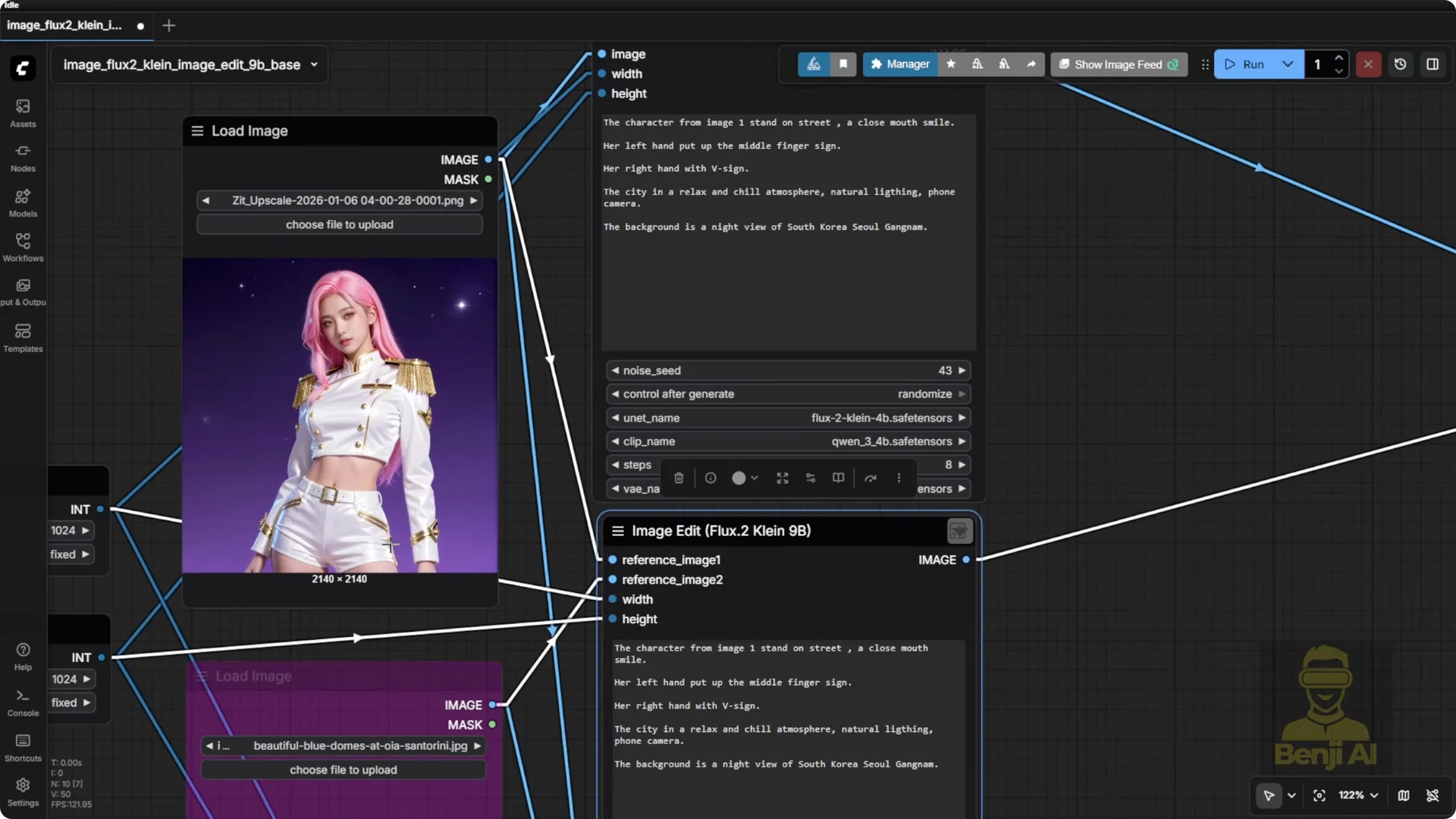
Both used their distilled versions, with file names pointing to the correct diffusion files.
Results on Gestures and Anatomy
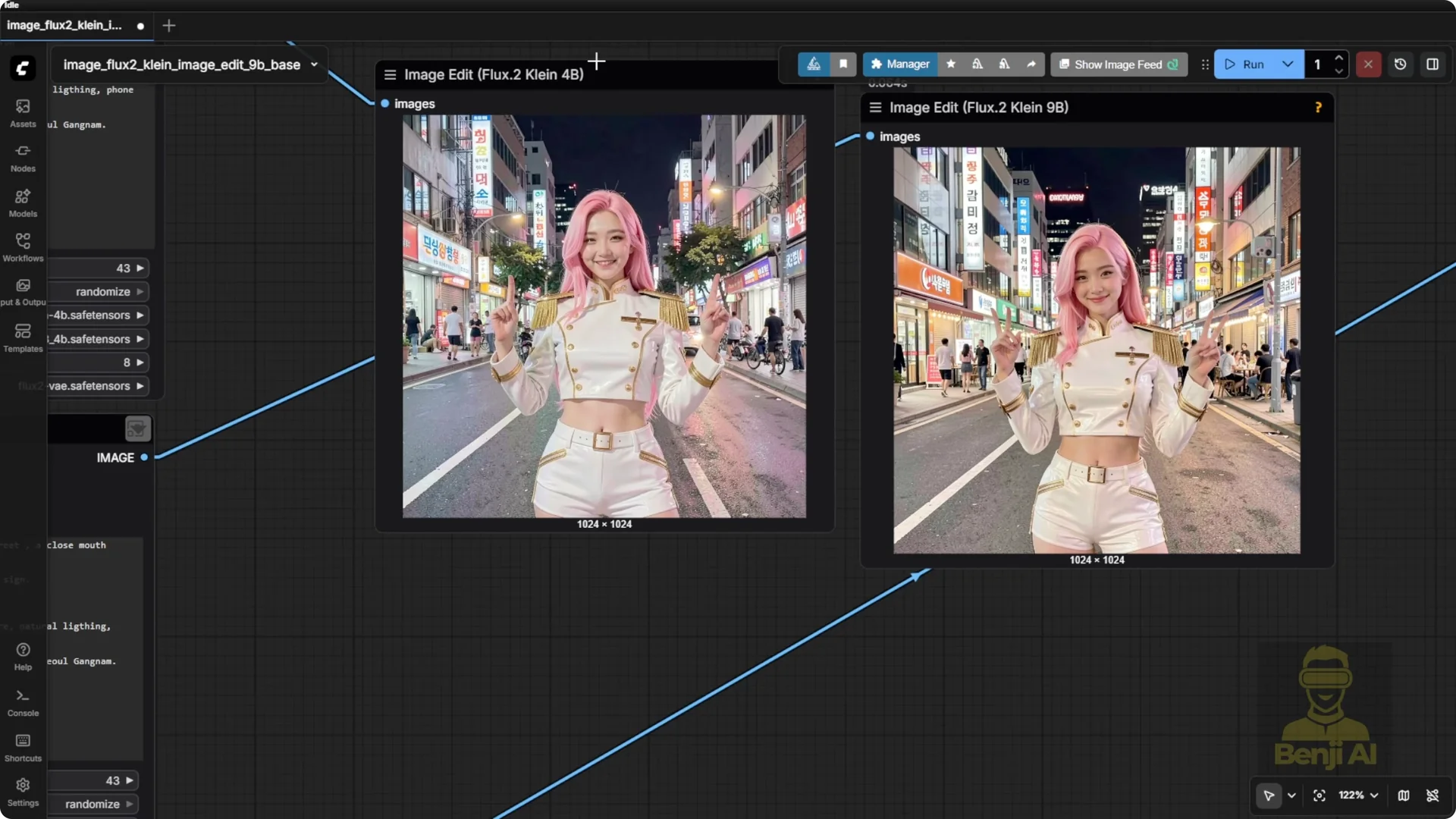
Flux models across Black Forest Labs lineup are sensitive when it comes to certain gestures. They really struggle with the middle finger. In the 4B output, both hands ended up showing index fingers instead, ignoring the prompt. The prompt was straightforward. Left hand does one thing, right hand does another. I wanted to test basic spatial reasoning and anatomy like distinguishing left from right and assigning different poses accordingly. They couldn’t.
As for facial expression, it gave a smile, but not with a closed mouth as requested. The face doesn’t resemble the reference image. That’s partly because the reference was generated in Zed Image Turbo, which has a very different aesthetic than Flux. Flux tends to render faces in its own stylized way, often drifting far from the original likeness.
The outfit details were surprisingly accurate. The golden shoulder decoration nailed it. The buttons on the jacket and the pattern on the side zip pocket of the shorts were replicated. Even the belt with its specific number of holes was almost exactly matched. While the face drifted, the clothing stayed faithful, which shows the model can latch on to strong visual cues when they’re prominent.
Black Forest Labs training data doesn’t seem to include a ton of Asian characters, so sometimes the facial features feel off for East Asian likenesses. The 9B version looks better. The face is less puffy and more refined. Background details are sharper, and the body proportions are much closer to the reference.
The 4B made the waist look oddly wide, while the 9B captured the figure more accurately. Neither matched the eye color.
The reference had light brown eyes, but both outputs gave black eyes.
These are small local models built for efficiency, not enterprise-grade photo realism. They’re meant to run on your PC. Manage expectations.
Qwen ImageEdit Outcome
I ran Qwen imageedit with the exact same prompt. I enabled its subgraph, which uses the familiar Qwen image edit with low clip VAE and the same sampler structure from previous builds, and used just one LoRA, Qwen image edit LoRA Lightning, for 4-step sampling. No extra effects, no add-ons, just the base model.
Quan handled the hand poses way better. Middle finger on the left, even if the pinky popped up too. V sign on the right. Perfect closed mouth smile. Natural and on point. The only downside is the style leans a bit cartoonish. Skin tones can look plasticky and the overall look is more 3.5D than photorealistic. For prompt adherence, it crushed it. Compared to Flux, Quan followed instructions better, while Flux offered slightly better realism in texture and lighting. For precise pose control, Flux couldn’t keep up. The 9B even gave six fingers on one hand. Hopefully, they fix it in future updates.
Night Scene Test
Starting from the same reference image, I asked all three models to transform the outside view into a nighttime cityscape.
Flux 2 Klein 4B
The 4B output added two extra window panes behind the character that weren’t in the original, so background consistency is a little off. The skin tone shifted darker, likely simulating nighttime relighting, which is understandable. The outfit, body shape, and general likeness stayed consistent.
Flux 2 Klein 9B
Much better. The concrete wall in the background matches the reference. The machinery behind it is preserved and the lighting adapts naturally to the night setting. It showed some extra stuff behind, like a desk, which wasn’t in the original.
Outside the window, the buildings look different, which makes sense because I asked for a busy nighttime urban city in South Korea.
The lighting on the character looks better than the 4B. The skin tone still reads clearly as Asian. It feels like a Korean girl. The realism style of the 9B model is doing a solid job.
Qwen ImageEdit 2511
The content outside the window changed, which matches the prompt. The interior of the building stayed consistent. The background, the concrete wall, and even the number of window panes matched.
There are exactly three window glasses in the reference and the generated output also has three. The character’s position stayed the same. It didn’t do automatic relighting. The Qwen image Edit community has created extra LoRAs for multi-angle lighting transitions or dynamic shadow relighting to enhance performance, but here I ran it clean.
All three models followed the main prompt, except the 4B model, which was off the mark. For changing the view outside the window, it does feel like a busy city in South Korea, even if it’s different from the original background.
Model Size Context
When it comes to realism and the aesthetic of human characters, it’s about 50/50 between Qwen ImageEdit and Flux 2 Klein.
Qwen imageedit is a larger model, about 20 billion parameters. Flux 9B is less than half the size, more like 40 percent the size of Qwen, yet it still performs at a surprisingly high level for character aesthetics.
I appreciate how they’ve focused on specific strengths, even in a small size model like this. I think this is the future for local AI models. Small but mighty, efficient but capable.
Multi-Image Reference Test in Flux 2 Klein Image Editing
I used two separate images. The first one has the character and there’s a lot going on in the background, including a car, which can be tricky because models sometimes blend or distort cars from different references.
To avoid that, I pulled the background from a completely different image. One image is set in a busy city and the other is in Santorini. The idea is to place the character into this new Santorini scene.
The text prompt for all three models: The character from image one is standing beside the house with the blue gate from image two. Position her on the left or right side near that area. She should still be holding her bat and she’s wearing a pair of sunglasses.
All three generated results followed those three key instructions. Surprisingly, the 4B model did the most natural blending of the character into the new environment.
- The weakest result was Qwen image edit. Even though it followed the instructions, the character didn’t feel like she belonged there. The scale is off, the pose is stiff, and it looks like she was copy-pasted onto the background.
- The 9B model tried harder. It adjusted the pose a bit, added a shadow that makes sense, and attempted to match the lighting of the sunny Greek setting.
- The 4B felt the most natural. The lighting was set properly. You can see the sunlight coming from the top right, and the character is stepping on the stairs with her body angled to match the slope of the terrain. It repositioned her like she’s actually standing there. Compared to the other two, which still feel like the character was cut out and resized to fit, the 4B nailed the integration.
There’s no absolute best or worst model. Sometimes one excels in realism, another in multi-angle consistency, another in environmental blending. It depends on the task.
Two-Character Merge Test in Flux 2 Klein Image Editing
Prompt: Take the character from image one and place her standing beside the character from image two. The first character should have her hand resting on the second character’s shoulder. The second character keeps holding her sword with purple lightning energy glowing from her robotic arm. Keep the futuristic lighting, camera angle, and overall vibe from image two.
All three models fulfilled the prompt. Hand on shoulder, sword with purple energy, two characters together. Now it’s about judging the quality of the composition and scene understanding.
- Comparing the 4B and 9B models: the 4B tends to push a higher white balance, making everything brighter than it should be. Even when switching from daytime to nighttime in earlier tests, it cranked up the brightness across the whole image, including the character who ended up looking unnaturally lit. The 9B handled relighting better. You can see the purple energy from the sword reflecting onto the character’s armor and faces, and the background elements from image two are faithfully recreated. Both got the objects right, but the 9B executed with more atmospheric awareness.
- Comparing Qwen image edit to the 9B: they’re close in overall execution. Both followed the text prompt exactly, but one thing Quan did better is facial detail. The reference character had subtle Korean-style makeup, soft eyeshadow, and defined brows, and Qwen included those nuances in the output. In contrast, both Flux models smoothed over those details, making the faces look generic and less like the original reference. In this three-way comparison, Qwen image edit followed the reference image most closely.
Flux 2 Klein Image Editing – Final Thoughts
Flux 2 Klein focuses on efficient local image editing with two sizes, 4B and 9B, plus distilled and base variants. The 4B Apache 2.0 model offers maximum freedom and low VRAM usage. The 9B distilled version brings higher fidelity within non-commercial limits. Quantized GGUF builds make 4B approachable for GPUs under 16 GB.
In testing, Flux 2 Klein tends to preserve clothing and scene structure well and can deliver solid environmental coherence, especially at 9B. It struggles with certain gestures and sometimes drifts on faces, while Qwen ImageEdit often adheres more strictly to pose and facial detail at the cost of a more stylized look. There’s no single local model that nails every request. Pick based on your preferred style, your workflow, and what your GPU can handle.
