Midjourney released an early version of their V8 model. You can use it by going to alpha.midjourney.com and choosing it in settings if it is not already selected. This is an alpha model, so it is not in its final state. It has not replaced earlier versions—those are still available under Settings.
V8 and your V8 results will likely live on the alpha website for the next several weeks as improvements roll out. I have been testing the new model extensively, and there are still many things I have not had time to try. It felt like a good time to step out of testing and share what I have learned so far.
For a quick tour of the platform and settings on the new site, see this overview of the Midjourney alpha website. Note that the Settings panel layout can change depending on your screen size or browser zoom—on wider/zoomed-out views it may appear in the right sidebar; zoom in and it can snap back to the top.
Midjourney V8 First Impressions: Getting started
Step 1: Go to alpha.midjourney.com and sign in. In settings, make sure V8 is selected. All older models remain available on the alpha site.
Step 2: Start with clear, grammatically correct prompts. If results feel off, add a few more specifics to help V8 adhere to intent. In V8, “more is often better”—it can comfortably handle longer prompts.
Step 3: If you want 2K resolution, add –hd to your prompt. HD jobs are four times more expensive, so test on standard jobs first.
- Relax Mode: Not currently available for V8. The team has discussed testing it soon, so availability may change.
- Negative prompting: There is no dedicated negative parameter. You can write exclusions in plain language (e.g., “without X”), but adherence can be inconsistent.
Midjourney V8 First Impressions: Overview
Right now some things are working well, some are not, and everything should improve. We are not talking about a finalized model, so my impressions are subject to change as I do more testing and as Midjourney releases updates. These things take time and will get better.
I have seen a wide range of reactions, from excitement to frustration. I am excited about improvements to prompt adherence, text rendering, and the ability to handle longer, more detailed prompts. I am also looking forward to the aesthetic improvements that are coming and the updated edit model, which should be out in the next month or so. The team has also indicated upcoming work focused on expanding imagination and “unexpected directions,” which should help the model feel more exploratory.
For context on how earlier alphas matured, see this look back at the V6 alpha release.
Midjourney V8 First Impressions: Prompting and adherence
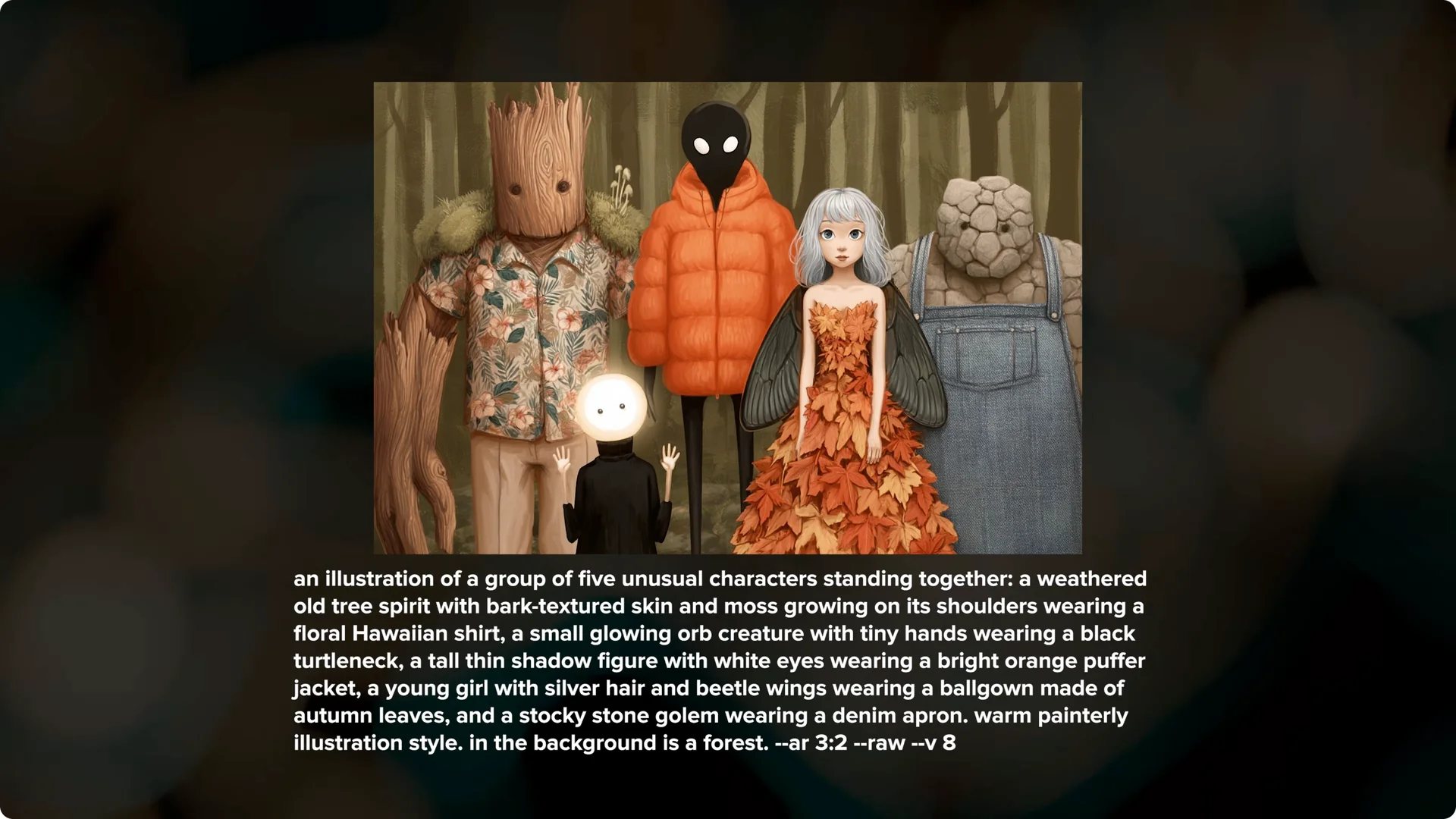
A big upgrade that stands out to me is prompt adherence.
V8 has incredible prompt adherence compared to V7.
I can ask for a scene with multiple distinct characters and V8 does a much better job keeping track of and consistently delivering on those details.
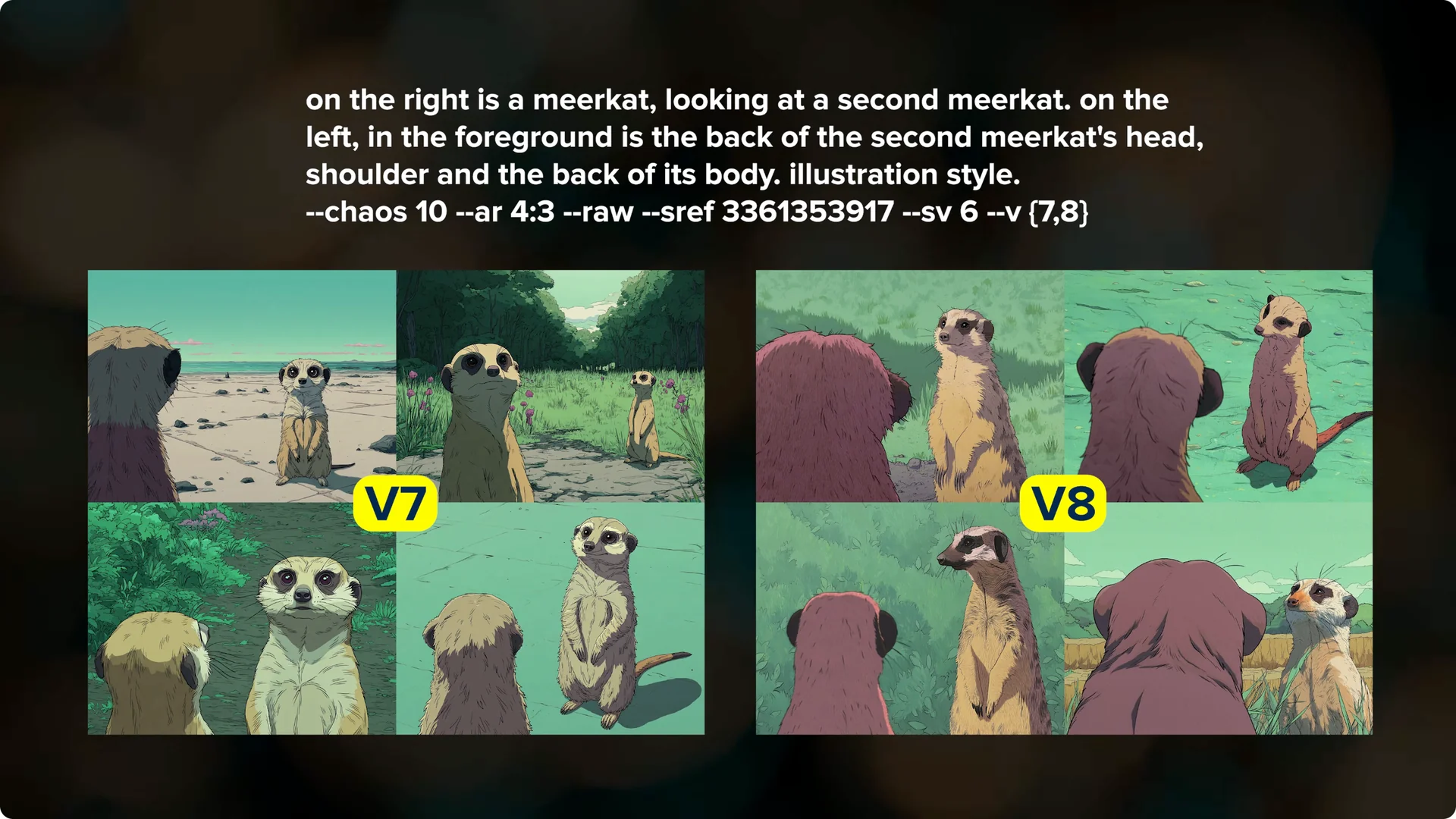
I also tried an over the shoulder prompt with an sref code.
V8 followed the prompt more consistently than V7, which is encouraging for complex compositions.
This also makes it easier to do weird things like creating an image of an animal with claws on the front and hooves on the back.
V8 seems to prefer longer and more detailed prompts compared to V7, but they still need to be clear and concise. You may need to adjust your prompting style.
Practical prompting tips
- Try parameter combos when quality matters:
--rawfor less default styling,--stylizefor stronger aesthetics,--q 4for higher coherence (costly), and--hdfor 2K output (also costly). - There is no negative parameter. You can phrase exclusions in text (“without red, pink, white, purple, or orange”), but results may still include some of those elements.
- Omni Reference and image prompting are not available right now. Style references (sref) do work.
Text rendering
V8 has significantly better text rendering compared to V7. It is impressively better, which is great to see. Community examples show crisp, legible lettering in designs and memes that would have failed before.
I have not played around much with prompting for a lot of different font or lettering styles yet.
Celebrity likeness (use responsibly)
V8 appears more accurate at representing public figures than earlier versions. While this can be technically impressive, consider the ethical and legal implications when generating celebrity likenesses.
Long prompts vs abstract prompts
It is still true that like V7, the model prefers clear, grammatically correct sentences. You might find that you have to word them differently or add a few more details. That adjustment period can be frustrating, but it is normal for a new model.
I am finding it hard to get aesthetically pleasing images with shorter prompts or more abstract poetic phrases. I often enjoy seeing where Midjourney takes me to spark new ideas, and that workflow is challenging at the moment, even with my global personalization. The team has said they are working on a big improvement to the underlying V8 aesthetics in the coming weeks, and I fully expect this to improve.
When V7 came out, I did not like my first few results either. As improvements rolled out and I learned how to best prompt with V7, my results improved. These things take time.
Two levers that help right now:
- Use
--rawto reduce default styling and regain some older-version feel. - Increase
--stylizebeyond the default (100). Higher values can produce noticeably more beautiful compositions, especially with style references.
Midjourney V8 First Impressions: Coherence and bodies
Body coherence still needs improvement. I think small faces look better in V8 compared to V7. With hand and limb coherence, some images look really good, but others still show odd hands or distortion.
I do think it is better, but not as big of a jump yet as I expected. I am continuing to test this across different subjects and lighting. I will keep an eye on how updates change this over the next few weeks.
Midjourney V8 First Impressions: HD mode and cost
There is a new HD mode that natively renders 2K resolution images. Add –hd to your prompt to try it. What I have run so far looks impressive, and if the price comes down, I could see myself using the 2K mode a lot.
HD jobs are currently four times more expensive. I am holding off on heavy HD testing until I work through other areas. If you are watching your fast hours, test at standard resolution first.
- HD is not just “sharper”—it can subtly change image behavior and outputs significantly larger files (e.g., ~1.5MB vs ~6.5MB in sample comparisons).
- If you need more structure, try pairing
--hdwith--q 4for extra coherence (at additional cost).
Midjourney V8 First Impressions: Styles, mood boards, and personalization
Style references, mood boards, and personalization profiles work with V8. Like HD mode, style references and mood boards are also four times more expensive right now. Be careful if you are experimenting at scale.
You can use images as srefs, and the same sref codes from V7 will work in V8. They will look a little different because it is a different model. Some sref codes look really nice, and others can show degraded image quality.
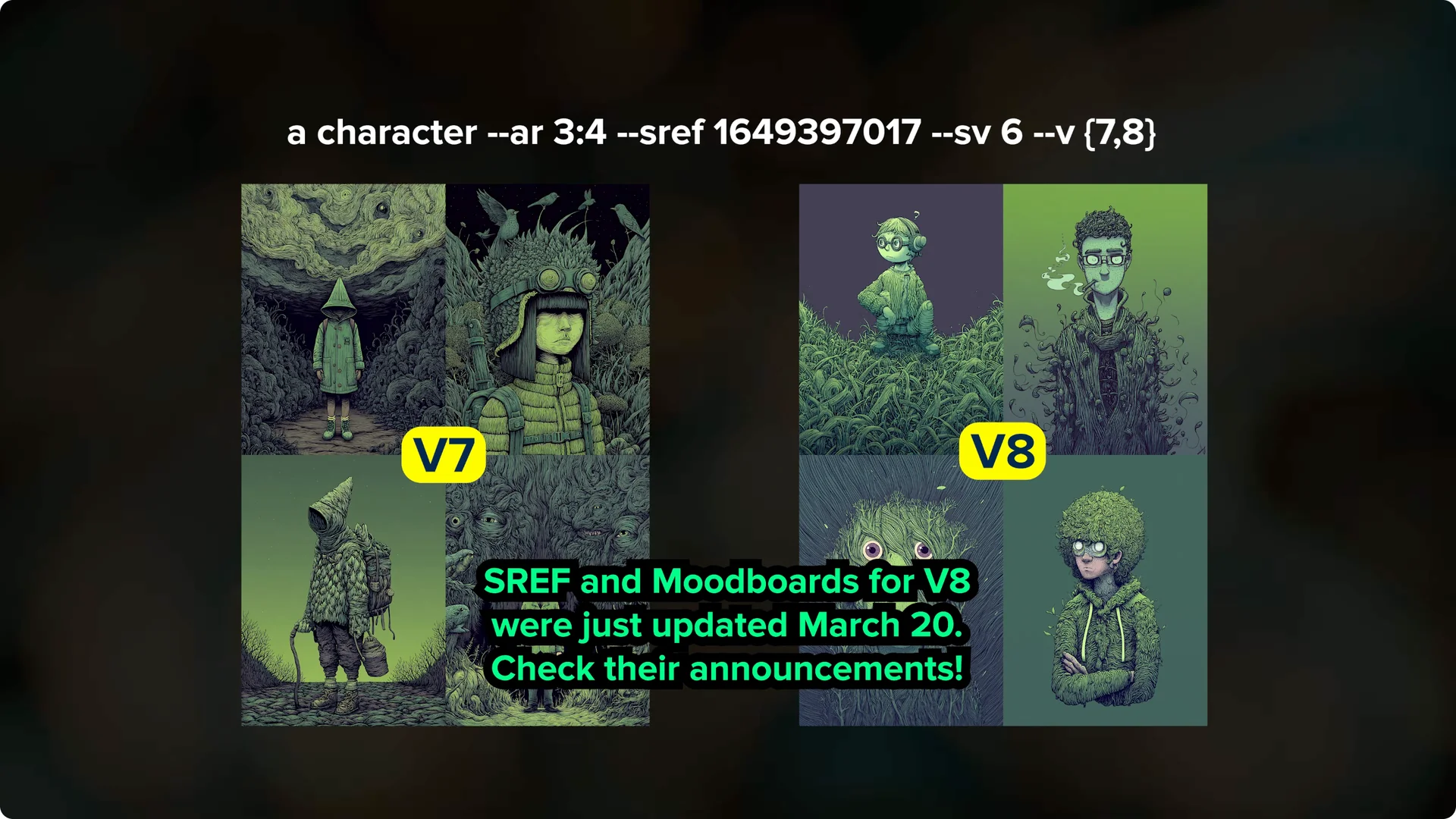
I have had a similar experience with mood boards. Some look okay, and others do not feel like they are pulling enough of the aesthetics from the mood board into the results.
The team will be rolling out updates here and is interested in specific examples that work better in V7 than V8.
All of your V7 personalization profiles can be used in V8. You do not need to set up any new ones at the moment, since they carry over from V7. The team recommends using your personalization profile instead of the default Midjourney aesthetics for best results.
I am not sure how I feel about my global personalization profile yet in V8.
I definitely prefer my personalized V7 results more right now. I am hoping this gets better soon.
If you care about profile privacy while you experiment, here is how to hide Midjourney images on your profile.
New personalization workflow on the alpha site
- Use the Personalize area in the left sidebar to create or edit profiles. Instead of picking from pairs, you’ll see a grid of images.
- The selector learns from both what you choose and what you skip, which speeds the process and produces stronger, more consistent aesthetics.
- Turning your P-code on can make a dramatic difference in look and quality compared to running without personalization.
Midjourney V8 First Impressions: Feedback that helps
One of the easiest ways to help improve V8 is by using the like and dislike buttons on your images. Anytime I get something that looks like a photo of an artwork, I mark those as do not like. Make sure to also mark the ones that you do like.
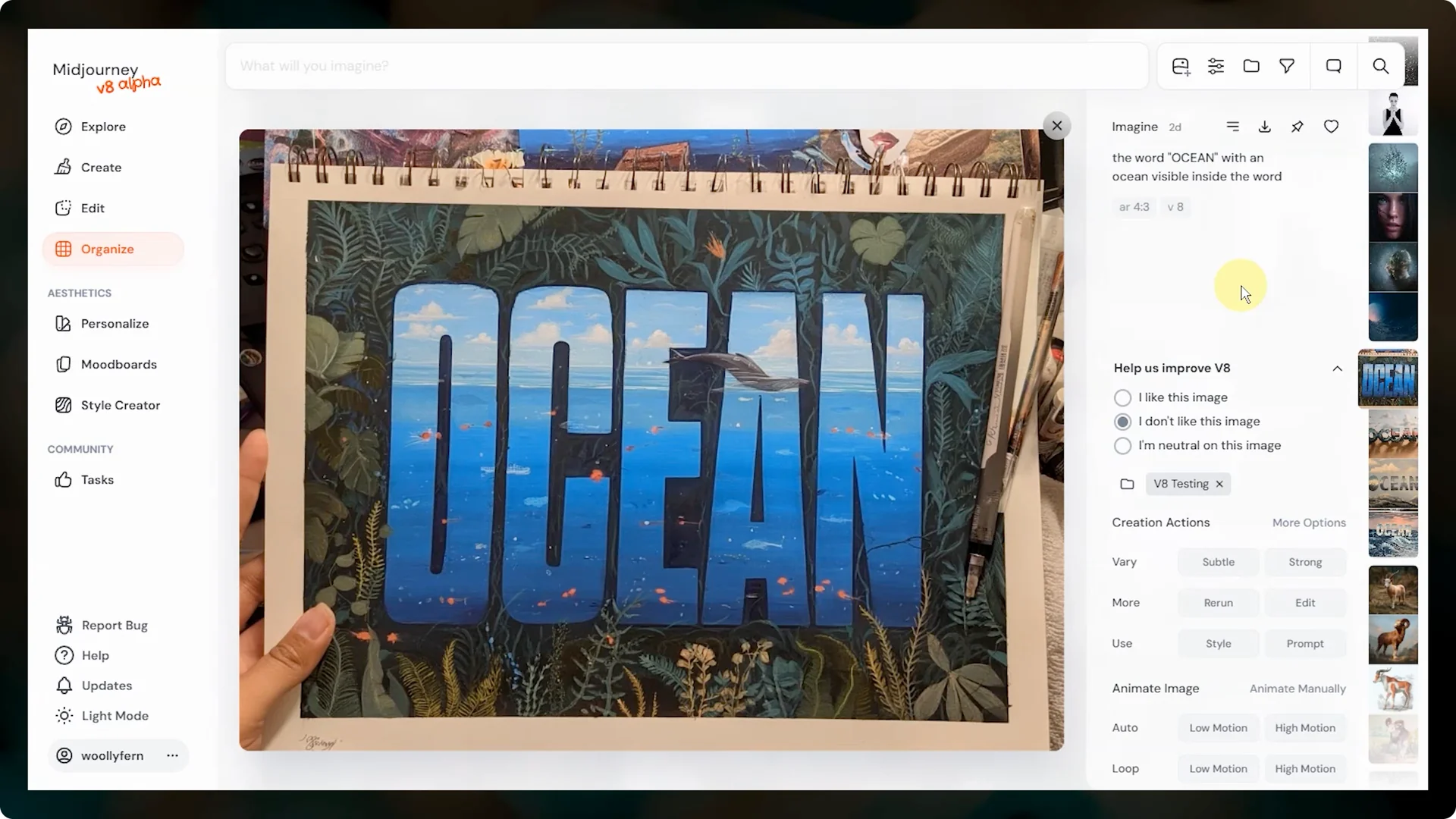
If you have examples that are specific to V7 versus V8 performance, you can share those on their Discord.
That helps the team see exactly what your experience is. The more targeted the example, the more helpful it is.
Midjourney V8 First Impressions: Parameters and availability
Weird EXP and the tile parameter are available in V8. Omni reference is not available, but something to replace it should be coming soon. Using an image as an image reference is also not available yet, and it is not clear if it will be.
There is no no parameter, and there likely will not be. We do have the quality parameter, and you can try –q 4 to get improved coherence, but it uses extra fast hours.
You can also use stylize, chaos, and raw, and many people are finding that using both raw and their personalization helps with aesthetics and image quality.
- Relax Mode is currently unavailable for V8 (subject to change as they scale servers).
- Image prompting is disabled for now; style references (sref) continue to work.
- Textual exclusions (e.g., “without X”) can partially substitute for negative prompting, but are not perfectly reliable.
- Video generation (“Animate”) uses the old video model; no updates yet. The editor is also unchanged for now, with a new version coming later.
Midjourney V8 First Impressions: Web interface updates
The web interface has been updated on the alpha site. The settings menu has moved to a sidebar. There is not a P button anymore for personalization profiles and mood boards.
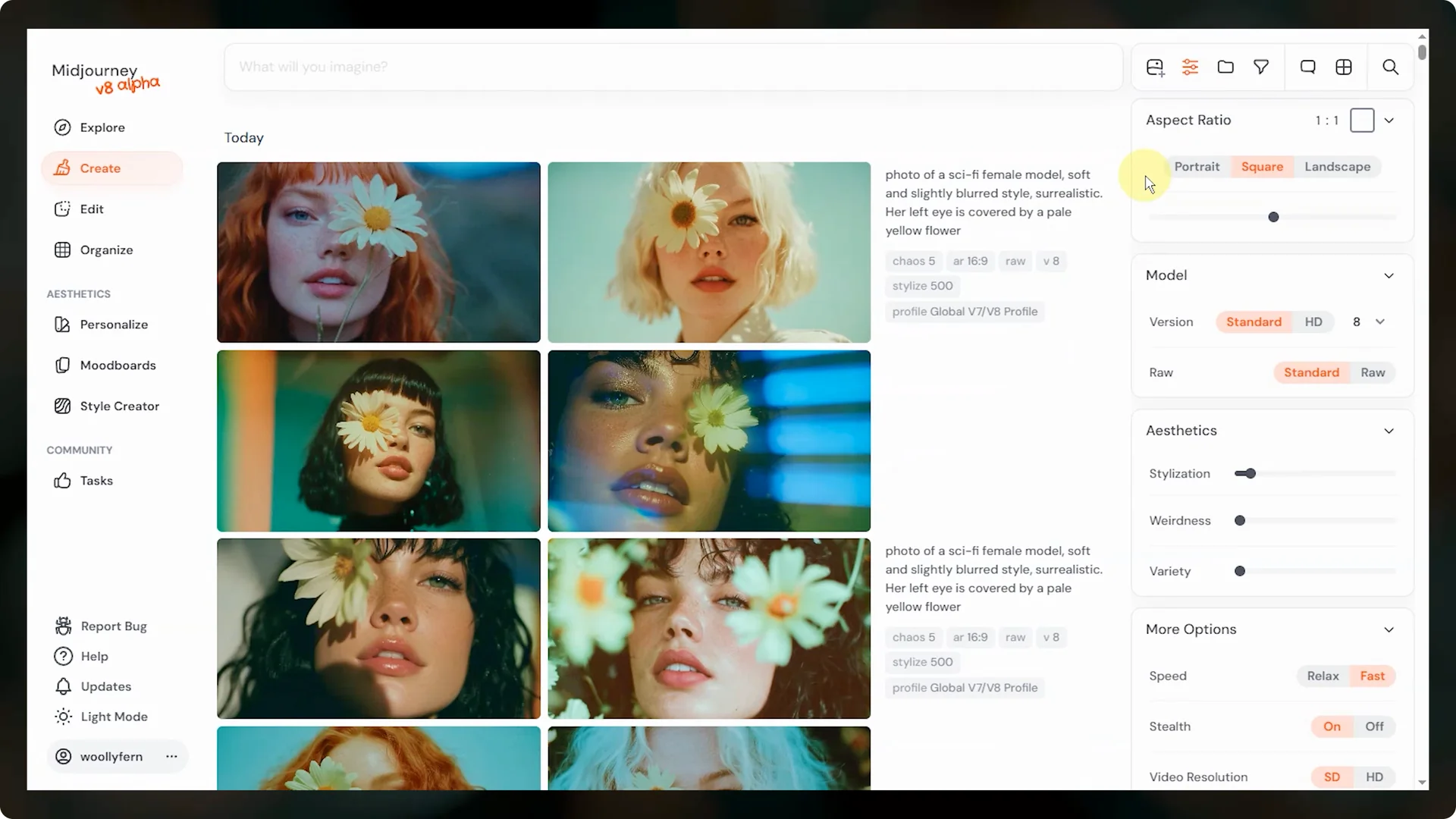
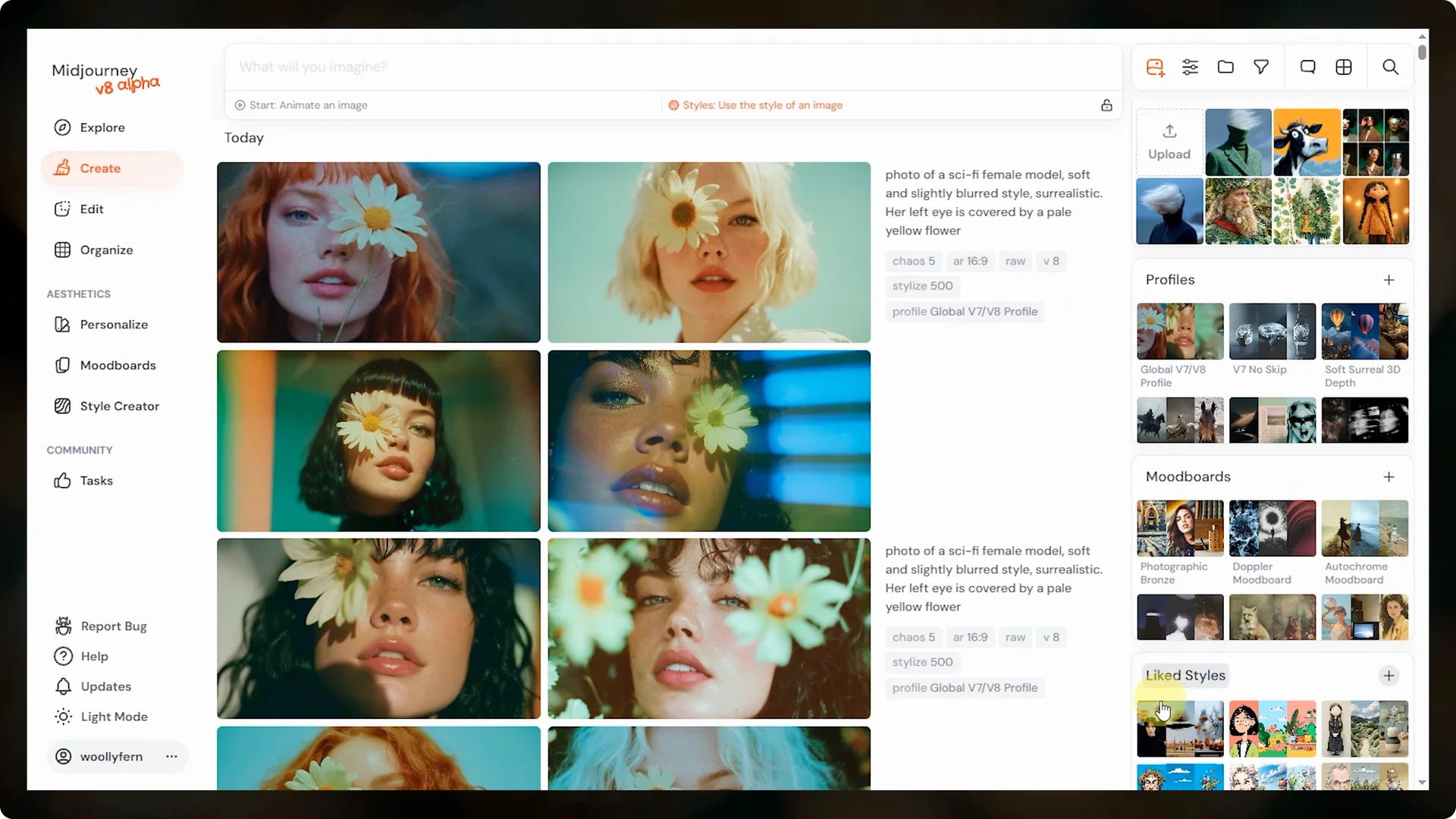
Click the image button to access your uploaded images, personalization profiles, mood boards, and liked styles.
If you click on liked styles, you can switch to created styles to see anything you have made with the style creator.
There is an improved conversation mode so that you can just talk and flow with the model.
There is also a grid mode that lets you focus on one big set of images at a time. New upscalers and a whole new edit interface are coming soon. For early notes on the upcoming editor, see these new image editor insights.
New UI notes
- Conversation Mode routes your request through an LLM that rewrites your prompt. This makes complex asks (like multi-panel memes with styled captions) easier—great for exploring text-heavy or narrative layouts.
- Grid View provides an alternate, denser layout for browsing results. Use it if you prefer a compact overview.
- Filters now appear on the Create page as well as on Organize, which can streamline or constrain your browsing depending on your workflow.
- Settings panel placement can shift based on your viewport or zoom level (sidebar vs top bar).
Midjourney V8 First Impressions: Should you switch now
If you try V8 and do not love it right away, you do not have to stick with it. You can continue using V7 and wait until V8 has matured enough to make its way over to the main website. That is expected to take one to two months.
Use the like and dislike buttons on your images to help V8 improve. Share specific examples in the ideas and features and prompt challenge channels on their Discord. V7 had a few rough edges when its alpha version first released, and it turned into a great model.
If you want more context about earlier platform shifts and feature rollouts, here is a concise recap of the V6 alpha release. It helps frame what to expect during this stage. Progress tends to accelerate once core feedback lands.
Final thoughts
Prompt adherence and text rendering are clear wins in V8, and longer, more detailed prompts are paying off. Aesthetics with short or abstract prompts and body coherence still need work, but updates are already in motion. If V8 does not click yet, stay on V7, share targeted feedback, and check back as the alpha evolves.
In the meantime, lean on parameter combos (--raw, higher --stylize, --q 4, and selective --hd), turn on personalization, and experiment with Conversation Mode for text-forward concepts. Everything here is alpha-stage and subject to change—as capabilities land and costs shift, your best practices will, too.
